


ADP Mobile Solutions
4.586.69K Reviews
App Specs
- Version
- 26.26.0
- Updated On
- License
- Free
- Downloads
- 10,000,000+
- Developer
- ADP, INC.
- Categories
- Business
- Platform
- Android, iOS
Screenshots
 Analysis by AppCompare
I think ADP Mobile Solutions makes the most sense when your employer already uses ADP and has enabled the parts of the service you need. It is a business app for handling everyday employee tasks, not a general job or personal-finance tool. ADP, INC. has built it around putting work information within reach on a phone, which can save a trip to a computer when you simply want to check a pay statement or look up a schedule. The app is free, rated for Everyone, and has a 4.5 average from around 751,000 ratings, with more than 10 million installs. Those figures suggest that it serves a large audience, but they do not guarantee that every employee will see the same tools: what appears in the app depends on the employer’s ADP setup.
What the app is like in everyday use
The practical appeal is straightforward: instead of treating payroll and work details as something you have to deal with only at a desk, you can check the employee information your organization makes available from your phone. For a quick check, that is more useful than opening a browser, finding a company portal, and logging in again. I would think of it as a convenient front door to an employer’s ADP services rather than a complete HR department in your pocket.
That distinction matters before downloading. If your employer does not use ADP, or has not enabled the functions you want, the app may not be useful to you even though it is available to install. I would first confirm that your workplace uses ADP and ask which employee services it has switched on. That small check can prevent the frustrating experience of installing an app and then finding that it does not match your company’s process.
Why employer setup shapes the experience
Employee self-service can make routine tasks less dependent on office hours. When you need to look up information away from work, a mobile route is handy; when you need a change that requires approval or a conversation with HR, the app should not be mistaken for a replacement for the people who handle that process. Its value is strongest for quick access and straightforward account tasks, while exceptions still belong with your employer’s usual support channels.
A useful way to approach it is to explore the sections your organization provides before relying on them. Check where your current employment details and pay information appear, note how the app handles sign-in, and find the right route for questions about records that look wrong. If a page is missing, that may reflect the company’s configuration rather than a broken feature. Keeping that in mind makes the app easier to judge fairly.
Features That Keep You in the Loop
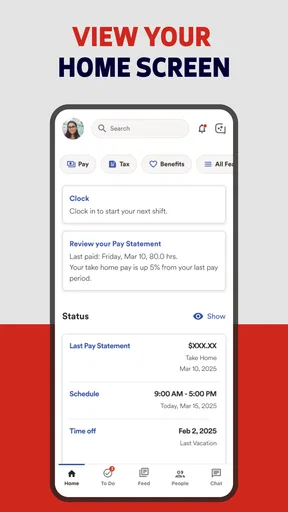
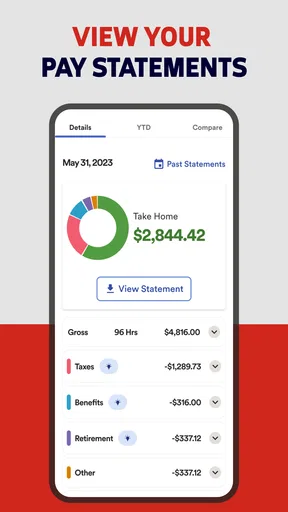
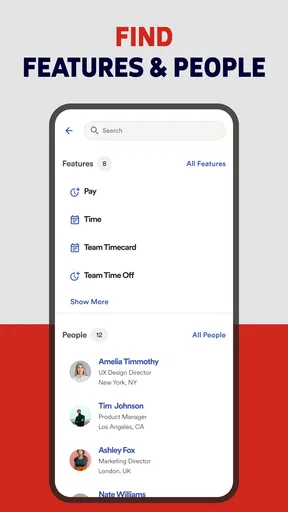
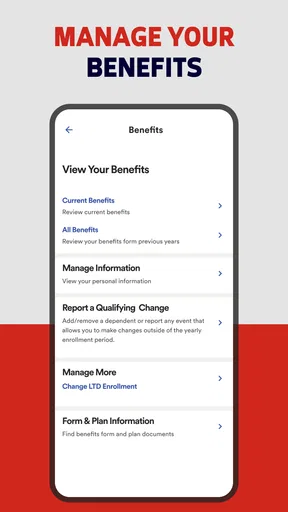
So, what makes ADP Mobile Solutions a game-changer? First off, the app provides real-time access to your payroll, benefits, and even your work schedule. No more digging through email threads or bugging your HR department. With just a few taps, you can see your pay statements, tax forms, and even set up direct deposit. Super handy, right?
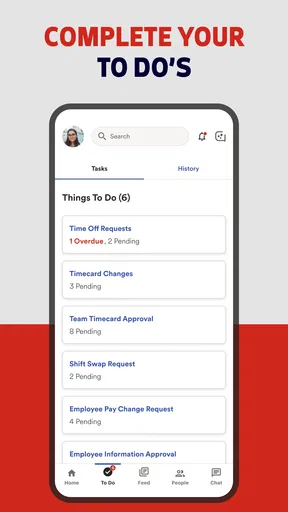
But that's not all. It’s also got this neat feature where you can request time off and track your vacation balance. Imagine planning your next getaway without the usual hassle. The app even lets you check your work schedule and swap shifts with colleagues if needed. Pretty convenient for those of us who live by the calendar!
Worth Reading Before You Choose

EA SPORTS FC Mobile 26 Is a Bigger Football Game, but It Takes Time

Flipboard Shows What News Apps Must Do Beyond the Feed

Switching to Android Auto Means Rethinking Your Driving Routine

Google Calendar Makes a Crowded Week Easier to Manage

Ludo King Makes the Most of the Minutes Between Plans

Baby Panda World Brings Quick Play to Modern Phones, but Its Game Library Feels Busy
A sensible workflow for pay and schedule checks
One useful habit is to open the relevant record when you have a specific question, rather than treating a mobile overview as a substitute for keeping track of important documents. For example, if a deposit seems different from what you expected, compare the pay statement with your own hours and notes before contacting payroll. The app can help you find the information quickly; it cannot explain a workplace decision or correct a source record by itself. Having the exact statement and the question ready makes a follow-up with your employer more focused.
For time off, I would check the balance before making plans and submit a request through the channel your workplace expects. A balance is useful context, but it is not the same as approval. That is an easy distinction to overlook when an app puts a number beside a request button. If your plans depend on a particular day, wait for the employer’s confirmation instead of assuming that submitting a request reserves the time.
Schedules benefit from a similar double-check. If a shift changes, review the latest schedule and make sure any swap has been accepted through the process your team uses. A phone view is convenient when you are away from a computer, but coworkers may still need to coordinate directly, and your manager may need to approve a change. I would treat the app as the place to check the official information available to me, not as a guarantee that a conversation or approval has happened.
Design and User Experience
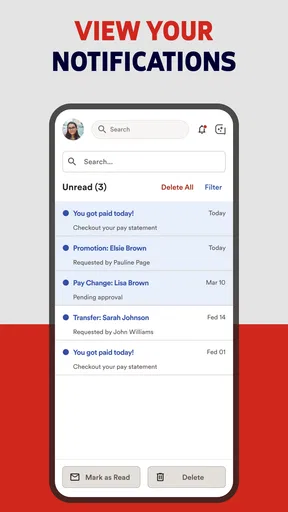
Now, let's chat about the design. The app is slick and easy to navigate. It's like ADP knew exactly what we needed and didn’t clutter it up with unnecessary fluff. The interface is intuitive, making it perfect for tech newbies and pros alike. Plus, the notifications are on point, ensuring you never miss an update.
However, like anything in life, it’s not all sunshine and rainbows. Some users have noted that the app can be a little buggy at times, especially when new updates roll out. But honestly, what app doesn’t have its off days?
Where mobile convenience has limits
For occasional checks, the phone format is a real advantage; for a long review of documents or a complicated benefits decision, I would rather use a larger screen if one is available. It is easier to compare details, keep a document open while asking a question, and avoid making a decision in a hurry. The app is best as a quick-access companion, not necessarily the most comfortable place to handle every work-related task.
Notifications can help draw attention to changes, but I would not use them as my only record of something important. A notification can be easy to miss while working, and it does not replace opening the relevant page to confirm what changed. For anything tied to a deadline, pay, or a planned absence, I would check the underlying information directly and keep to any workplace instructions about confirmation.
There is also a practical boundary around personalization. Employees may expect one consistent set of menus, but an employer’s configuration can make the experience look different from someone else’s. If a colleague describes a tool you cannot find, compare your employer’s setup before assuming your account is malfunctioning. That is a more productive first step than reinstalling or repeatedly changing settings without knowing whether the service is enabled for your workplace.
How it compares with other ways to manage work details
Compared with a desktop employee portal, the main advantage is access while away from a computer. That is valuable for a quick pay or schedule check, but a browser on a larger screen can be more comfortable for reviewing several documents or handling a task that requires careful reading. Compared with email, the app gives you a more direct place to find account information instead of searching old messages; email may still be necessary for explanations or conversations that the self-service tools do not handle.
It is also different from a general calendar or budgeting app. Those tools can help you plan around a schedule or track your own spending, but they do not serve as the employer’s source for the employee records made available through ADP. Conversely, an ADP employee app is not a replacement for a personal calendar or a full budgeting tool. I would use each for what it does best: check workplace information in the employer-connected service, then decide what to copy into personal planning tools.
The best alternative depends on the task. If you need an official work record, use the employer’s designated system, whether that is this app or another company-approved route. If you want to organize your own calendar, a calendar app is usually more flexible. And if you need an explanation of a policy, payroll adjustment, or benefits choice, direct help from your workplace is more appropriate than expecting a self-service screen to answer a nuanced question.
Privacy and Security
Security is a biggie, and ADP takes this seriously. With secure login options and encryption, your personal data is safe. You can also set up fingerprint or face recognition, which adds an extra layer of protection. It’s like having your own digital security guard.
But remember, the app's security is only as strong as your password. So, no "123456" or "password" nonsense, okay? Keep it strong and unique.
Because this is tied to employment information, I would be deliberate about using it on a device other people can access. Locking the phone itself and avoiding a shared device for account access are simple habits worth keeping. Biometric sign-in may be convenient where available, but convenience should not lead you to leave an unlocked phone unattended. If your employer has specific instructions for account access, follow those rather than assuming a setting that works for one workplace is right for another.
Version history and what existing users should expect
The current version is 25.50.0, and the app has been available since April 1, 2013. That long span tells me this is an established service rather than a newly launched experiment, while the version number shows that the software has continued to move through releases. It does not, by itself, tell me which particular feature changed or whether a recent change affects every employer’s configuration, so I would avoid assuming that a new version means a new tool will appear in every account.
For someone who already uses the app, the sensible approach is to keep it current and check that familiar tasks still work after an update. If something looks different, confirm that you are in the right account and that your employer still offers the relevant service before treating the change as a loss of access. For a prospective user, the current release is simply the version to evaluate on a supported device; the app requires Android 10 or later. Product updates can improve the experience over time, but any future changes are expectations, not a promise about what your employer will enable.
Who will get the most from it
I would recommend trying it if your employer uses ADP and you regularly need to check work-related information away from a desk. People with changing schedules, employees who need to review payroll details, and anyone who wants a convenient way to start a time-off request may find the mobile access worthwhile. It is particularly useful when a task is small and time-sensitive: checking a shift before leaving home, for instance, or confirming a pay statement while gathering information for a question to payroll.
It is less compelling if you rarely use employee self-service, prefer handling work administration on a computer, or need features your organization has not enabled. It is not the right choice for someone seeking a standalone payroll service, a job-search app, or a general finance manager. And if your work requires a detailed explanation rather than access to a record, contacting the relevant person at your employer will usually be faster than searching through menus.
A realistic day-to-day example is an employee who wants to arrange a long weekend. They can check the available time-off balance, submit a request in the app if that option is enabled, and then wait for the employer’s decision before booking anything that cannot be changed. If a shift needs to be covered, they can check the schedule and follow the workplace’s process for a swap. This saves time locating information, while still respecting the fact that a request and an approved change are not the same thing.
What I would keep an eye on
When deciding whether the app is working well for you, focus on the tasks you actually need: can you reach the right account, find the relevant record, and understand what action comes next? If the answer is yes, the mobile format is doing its job. If you repeatedly need to leave the app to resolve a basic issue, note what information you were seeking and ask your employer which channel is intended for it. That is more useful than expecting every organization to configure employee self-service in the same way.
I would also watch how clearly the app distinguishes information from action. A displayed balance, a submitted request, and an approved request can have very different consequences. The same goes for a schedule that you can view and a shift change that has been accepted. Reading the status carefully is a small but important habit, especially when plans depend on an employer response.
Final Thoughts
Overall, ADP Mobile Solutions is a must-have for anyone looking to streamline their work-related tasks. Whether you're checking your pay, managing your schedule, or planning your next vacation, this app covers all the bases. Sure, it might have its hiccups, but the pros definitely outweigh the cons.
So, if you're ready to take control of your work-life with ease, give it a whirl. Your future self will thank you!
Pros
- Intuitive user interface for easy navigation.
- Seamless integration with payroll systems.
- Real-time notifications for important updates.
- Access to detailed pay and tax information.
- Secure login with biometric authentication.
Cons
- Limited functionality for non-employee users.
- Occasional sync issues reported by users.
- Requires internet connection for most features.
- Customer support response can be slow.
- Some features hidden behind paywall.
FAQs for ADP Mobile Solutions
What is ADP Mobile Solutions and who is it for?
ADP Mobile Solutions is an app designed to provide employees with easy access to their HR and payroll information. It is ideal for employees who need to manage their work-related information on the go, including viewing pay statements, managing time-off requests, and accessing company news and benefits information.
Is ADP Mobile Solutions secure to use?
Yes, ADP Mobile Solutions prioritizes security to protect user information. It employs robust encryption and authentication protocols to ensure that sensitive data, such as payroll and personal details, are kept safe. Users should ensure their device is secure and use strong passwords as additional precautions.
Can I access all my payroll information through the ADP Mobile Solutions app?
While ADP Mobile Solutions provides access to a wide range of payroll information, such as pay statements, tax forms, and direct deposit details, the extent of available features may depend on your employer's ADP package. It is advisable to check with your HR department for specific functionalities available to you.
What devices are compatible with ADP Mobile Solutions?
ADP Mobile Solutions is compatible with both Android and iOS devices. Users need to ensure their device meets the app's system requirements, which typically include having a recent version of their operating system installed. Regular updates are recommended to ensure optimal performance and security.
How do I troubleshoot login issues with ADP Mobile Solutions?
If you encounter login issues with ADP Mobile Solutions, first ensure that you are entering the correct credentials. If problems persist, try resetting your password or contacting your HR department for assistance. Additionally, check for app updates or reinstall the app to resolve any software glitches.


